If that scenario sounds familiar, you've likely bumped into the printing method that makes it possible — digital printing. Yet plenty of business owners still confuse it with "regular" printing, or assume the output quality lags behind traditional presses. That assumption is years out of date.
This guide breaks down what digital printing actually is, the main types you'll run into, and where it delivers the most value, whether you're producing 200 postcards or 20,000 personalized mailers.
Key Takeaways
- Digital printing sends files straight to press, skipping plates and makeready delays
- Five core technologies cover everything from postcards to vinyl banners
- Personalized direct mail lifts response rates for 88% of surveyed marketers
- Offset still wins at very high volumes; digital wins on speed and flexibility
- The right print partner minimizes digital's limitations and keeps campaigns on schedule
What Is Digital Printing?
Digital printing transfers images straight from a digital file onto paper, cardstock, vinyl, fabric, or other substrates using ink or toner. There's no physical printing plate involved, according to Xerox's technical definition of the process.
That single detail separates digital printing from offset lithography, which requires a fresh plate for every job and every color change. Skip the plates, and you skip the setup time, the makeready waste, and the cost of switching designs mid-run.
This plate-free approach also unlocks variable data printing (VDP) — the ability to change names, images, or offers on every single piece without slowing the press down. A run of 5,000 postcards can carry 5,000 different names and offers, at digital speed.
How the Process Actually Works
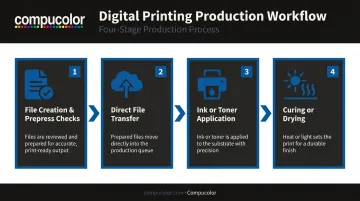
Every digital print job follows a similar path, though specifics shift depending on the press:
- File creation and prepress checks – Designers build the file, then prepress software inspects it for resolution issues, missing fonts, and color problems before production.
- Direct file transfer – The approved file goes straight to the digital press. No plate-making step sits between design and production.
- Ink or toner application – Inkjet presses spray microscopic droplets. Toner-based presses fuse powder to the substrate using heat and pressure.
- Curing or drying – Aqueous inks dry naturally, UV inks cure instantly under light, and toner fuses under heat. The method depends on the press technology, not one universal step.
Material Versatility Matters
Digital printing isn't limited to paper. Depending on the press, it handles:
- Cardstock and coated paper for business collateral
- Vinyl for banners and outdoor signage
- Fabric and specialty substrates for promotional items
- Synthetic and textured stocks for premium finishes
Because there's no plate to produce, the gap between "file approved" and "product in hand" shrinks dramatically. That's the whole appeal for teams working against a deadline.
Types of Digital Printing
Not all digital printing works the same way. Five core technologies dominate commercial production, each suited to different jobs.
| Type | How It Works | Best For |
|---|---|---|
| Inkjet | Nozzles spray microscopic ink droplets onto the substrate | Variable data, photo reproduction, full-color marketing pieces |
| Laser (toner) | A laser charges a drum; toner transfers and fuses with heat | High-volume, text-heavy documents and quick office runs |
| Solid ink | Wax-based ink melts, jets onto the surface, then hardens instantly | Bold wide-format signage and graphics |
| Dye-sublimation | Heat transfers dye into fabric, metal, or plastic substrates | Vibrant, long-lasting event badges, plaques, and promotional items |
| Production digital press | Combines inkjet or liquid electrophotography at industrial scale | High-quality variable data runs like personalized direct mail |
Inkjet and Laser: The Workhorses
Inkjet presses excel at anything photo-heavy or personalized, since droplet placement can change instantly between pieces. Laser printing fuses toner with heat instead, making it the faster, cheaper option for text-dense runs like manuals or internal reports.
Solid Ink and Dye-Sublimation: The Specialists
Solid ink cartridges melt on demand and produce bold, saturated color that holds up well outdoors — hence its use on banners and point-of-sale graphics. Dye-sublimation takes a different route: heat vaporizes dye and bonds it directly into fabric, metal, or plastic, so color won't crack or peel. That's why it's a go-to for event badges and promotional giveaways that need to survive daily wear.
Production Presses: Scale Without Sacrifice
Production-grade digital presses aren't a separate ink technology. They're high-volume configurations of inkjet or liquid electrophotography built to push near-offset quality at digital speed. That scale is what makes large personalized direct mail campaigns financially realistic instead of a novelty.
Applications of Digital Printing
Digital printing touches nearly every printed piece a modern business produces. A few categories make up most of the work:
- Business collateral and marketing materials – Business cards, letterhead, brochures, and presentation folders rarely need 50,000 copies; they need frequent updates instead, and digital handles short runs and reorders without offset's setup penalty.
- Point-of-purchase and retail signage – In-store banners, shelf-talkers, and seasonal displays often need to turn around within days of a promotion decision, a timeline digital and wide-format presses make realistic.
- Short-run publishing – Magazines, catalogs, and booklets increasingly print in smaller batches, letting on-demand digital runs avoid the warehouse costs and waste tied to large offset orders that may not sell through.
Personalized Direct Mail
This is where digital printing earns its keep. Variable data printing lets a single run carry different names, images, or offers on every piece, with no design changes required mid-job.
The payoff is measurable: according to Lob's 2025 State of Direct Mail report, cited by USPS, 88% of marketers say personalized direct mail significantly improves response rates.
Compucolor, for one, pairs its digital presses with in-house creative and mailing services, so a campaign can move from concept to mailbox without switching vendors mid-project.
Specialized Applications
A few sectors lean specifically on digital printing's speed and personalization:
- Political and advocacy mail – Rapid, targeted messaging tailored by recipient demographic, often produced on tight election-cycle timelines.
- Fine art and giclée reproduction – Professional inkjet presses using pigment inks and archival papers let artists reproduce work at gallery quality without commissioning a full print run.
- Event programs and annual reports – Personalized attendee names, sponsor acknowledgments, and updated content printed close to the event date without a full reprint order.
Each application shares one theme: digital printing removes the volume threshold that used to gate access to professional-quality print.
Digital Printing vs. Offset Printing
Offset and digital printing aren't really competitors. They're tools suited to different jobs.
Offset printing requires a physical plate for every color and every job. That setup cost is real, but it pays off at high volume — once a plate is made, running extra thousands of sheets costs very little, and color stays exact across the whole run.
Digital printing skips the plate entirely, making it the faster, cheaper choice for:
- Short-to-mid run jobs
- Quick reorders with no lead time
- Designs that change between print runs
- Personalized or variable data campaigns
Where the Crossover Actually Sits
There's no single magic number where offset suddenly becomes cheaper; it depends on the press, the job, and the shop. Ricoh's modeling puts the crossover point somewhere between roughly 4,000 and over 12,000 A4 impressions, depending on equipment age and efficiency, with a current base scenario closer to 10,000 impressions.
Newer, faster offset presses push that crossover lower, while older equipment pushes it higher. If your job involves personalization, the math changes entirely, since offset can't vary content within a run.
| Factor | Digital Printing | Offset Printing |
|---|---|---|
| Setup cost | Minimal, no plates | Higher, plates required per color |
| Best run length | Short to mid-volume | High volume |
| Turnaround | Faster | Slower, due to makeready |
| Personalization | Yes, variable data supported | No, static plates only |
| Color consistency at scale | Good | Excellent |
| Per-unit cost at high volume | Higher | Lower |
Run quantity alone shouldn't drive the decision. Factor in personalization needs, turnaround, and how often the design will change before committing to one method.
Advantages and Limitations of Digital Printing
Advantages
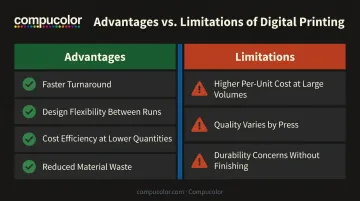
Digital printing's biggest strength is flexibility. In practice, that means:
- Faster turnaround – No plate-making step means jobs move from file approval to finished product much quicker.
- Design flexibility between runs – Update copy, imagery, or offers without retooling anything.
- Cost efficiency at lower quantities – Short runs avoid the setup costs that make offset impractical below a certain volume.
- Reduced material waste – Precise ink and toner application means fewer wasted sheets during setup, compared to offset makeready.
Limitations
Digital printing isn't the right fit for every job:
- Higher per-unit cost at large volumes – Once a run climbs into the tens of thousands, offset's economies of scale usually win.
- Quality that varies by press – Output depends heavily on the specific technology and equipment used, so not every digital press produces gallery-quality results.
- Durability concerns without protective finishing – Pieces exposed to weather or heavy handling often need lamination or coating to hold up over time.
None of these are dealbreakers so much as considerations. Compucolor's mix of HP Indigo digital presses and in-house finishing, from lamination to coating, addresses most of these limitations directly.
Choosing the Right Digital Printing Partner
What to Look For
Not every print shop closes the gaps digital printing leaves open. Before committing to a partner, ask about:
- Turnaround time – Can they commit to a specific window, or just "a few days"?
- In-house design and creative support – Fewer vendors means fewer delays and miscommunications.
- Environmental certifications – Sustainable Forestry Initiative and similar certifications signal responsible sourcing to clients and stakeholders.
- Transparent, accurate quoting – Surprise costs after the fact are a red flag.
Compucolor addresses each of these directly:
- Orders typically move through production in 24-72 hours
- File submission happens online, with no back-and-forth emails
- An in-house creative team handles design revisions, with no third-party vendor added to the timeline
The company also holds Sustainable Forestry Initiative membership and other environmental certifications, addressing sourcing concerns for environmentally conscious clients.
Ask About Variable Data and Mailing Services
If personalized marketing is on the roadmap, ask potential partners two direct questions:
- Do they support variable data printing at scale, not just as a checkbox feature?
- Can they handle the entire direct mail process, from design through mailing, under one roof?
A one-stop setup covering design, print, and mail removes the handoff points where campaigns typically stall. That's a meaningful advantage for any team running personalized marketing on a deadline.
Frequently Asked Questions
What is the difference between digital printing and regular printing?
"Regular" printing usually refers to offset printing, which requires a plate for every job and every color. Digital printing skips plates entirely, making it faster and more flexible for shorter runs.
What are examples of digital printing?
Common examples include business cards, personalized direct mail, brochures, banners, and custom promotional items. Fine art reproductions and event signage also rely heavily on digital presses.
Is digital printing cheaper than offset printing?
Digital printing is generally more cost-effective for smaller quantities since it avoids plate setup costs. Offset becomes cheaper per unit once volume climbs into the tens of thousands.
How long does digital printing take?
Turnaround is typically much faster than offset since there's no plate-making step involved. Compucolor, for example, typically completes orders within 24-72 hours depending on job complexity.
Can digital printing be used for large quantities?
Yes, digital presses can handle large runs, but offset typically becomes more economical beyond roughly 10,000 impressions, depending on the equipment used.
What materials can be digitally printed?
Common substrates include paper, cardstock, vinyl, and fabric, plus specialty materials like metal or plastic depending on the press technology. Options vary by provider and equipment type.